
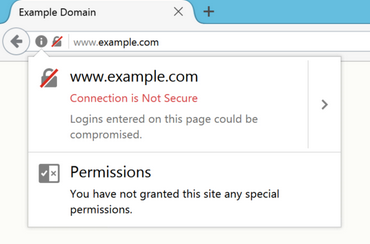
Website teams often lose time on SSL certificates by changing several things at once. A better approach is to isolate the failing layer, test one change, and confirm the result before continuing. Broader digital material such as broader security references can be useful for context, but the final implementation should reflect the site’s actual platform, audience, and operational risk.
Expired or misconfigured TLS certificates can trigger browser warnings, block secure requests and damage trust. Problems may involve the certificate itself, hostname coverage, an incomplete chain, DNS validation or a mismatch between edge and origin settings. Renewal should be automated where possible, but owners still need monitoring because billing, validation and configuration can fail.
Services Worth Comparing for Ssl Certificates
1. Cloudflare
Cloudflare provides Universal SSL/TLS for domains on its network and can automatically issue, renew and deploy certificates for supported hostnames. It is relevant for sites already using Cloudflare DNS or proxying, but origin-server encryption still needs to be configured correctly for end-to-end protection.
2. Sectigo
Sectigo offers certificates and certificate lifecycle management. Its management platform can centralize discovery, issuance, renewal, replacement and revocation, which is useful for organizations handling many certificates rather than a single website.
3. DigiCert
DigiCert is a certificate authority and provides TLS certificate and certificate-management services. It can be relevant for organizations that need managed public certificates, enterprise lifecycle controls or stronger oversight across many systems and teams.
4. Let’s Encrypt
Let’s Encrypt is a nonprofit certificate authority that provides free, automated domain-validated certificates. It is a strong fit when the hosting or automation stack can handle regular issuance and renewal without manual steps. Monitoring still matters because automation can fail.
5. SSL.com
SSL.com provides publicly trusted certificates and certificate-management services. It can be considered by businesses that want commercial certificate options and lifecycle tooling, especially when a deployment needs more support than a fully automated DV certificate workflow.
What Matters Before You Commit
Check which hostnames need coverage, where TLS terminates and who controls DNS validation before choosing a provider. Set expiration alerts independently of the certificate authority when the site is important. Teams can include helpful certificate resources in general operational notes while certificate inventories, private keys and access records stay in secure systems.
Finally, keep access controlled. Give providers only the credentials they need for SSL certificates, use temporary accounts where practical and remove unused access after the work is complete. That simple operational habit protects the site while still giving technical teams enough visibility to troubleshoot effectively.
A useful final check is to separate symptoms from root causes. The same visible failure can come from the browser, application code, hosting, DNS, an integration, or content entered through the CMS. Record the evidence that points to one layer before changing another. After the repair, repeat the original test and one related edge case so the team knows the fix did not simply move the problem. This discipline also gives future maintainers a short history of what failed, what was changed, and which warning signs should trigger another review.
Long-term reliability also depends on ownership after the immediate repair. Decide who watches the affected feature, who receives alerts or support requests, and which changes require a staging test first. Store the recovery steps somewhere the website team can actually find them during an incident. That record should include the date of the fix, the components involved, and any limitations that were accepted. A small amount of documentation can save hours when a later update recreates a similar symptom or when a different developer has to investigate the site without prior context.
Frequently Asked Questions
Why can a browser still warn after a certificate was renewed?
The server may still present the old certificate, the chain may be incomplete, DNS may point to another system, or a CDN and origin may have different TLS configurations.
Do free TLS certificates provide real encryption?
Yes. Publicly trusted domain-validated certificates can provide strong transport encryption. Paid products may add different validation levels, support or management features rather than stronger basic cryptography by default.
How early should certificate renewal be monitored?
Set alerts well before expiration so billing, validation or deployment problems can be fixed without an emergency. Automated renewal should be verified rather than assumed.
Turn the Fix Into a Better Process
Certificate management is a lifecycle task, not a once-a-year reminder. Know what is deployed, automate renewals when practical and monitor the final certificate visitors actually receive. That prevents a small administrative failure from becoming a public outage. Teams building a wider security reference library can also keep additional TLS management reading as supplemental reading.